Documentation
Sheetwarden is a TypeScript library that opens, calculates, renders and edits Excel workbooks in the browser. This page covers installation, the viewer and engine APIs, licensing, support and limits. It assumes a bundler such as Vite, webpack or esbuild.
Overview
The package contains two layers that you can use together or separately.
- The viewer. A complete spreadsheet UI mounted on an element you provide: ribbon, formula bar, canvas grid, sheet tabs, find, inspector, dialogs. It renders inside a Shadow DOM so its styles and yours do not interact.
- The engine. Plain functions for parsing, calculating and serialising workbooks without any UI. Use these to grade a submitted workbook, recalculate a model in a worker, or drive your own grid.
Everything runs in the page and its Web Workers. The library makes no network requests, including for the licence check. Supported inputs are .xlsx, .xlsm, .xlsb, .xls, .csv and .tsv, including password-protected OOXML and legacy files.
Install
Licensed customers receive credentials for the private npm registry and a download link for the versioned release archive. Evaluators can request an evaluation archive; it is the same build.
npm install @sheetwarden/viewerThe package is an ES module with TypeScript declarations and a Web Worker asset. The worker is referenced with new URL('…', import.meta.url), which Vite, webpack 5, Rollup and esbuild all understand, so your bundler emits it alongside your own chunks. No CSS import is needed. The bundle targets ES2022.
If you are not using a bundler, copy the whole dist/library directory from the archive to your host and import excel-viewer.js from there. Keep the assets folder next to it; the worker is loaded relative to the module.
Quick start
import { createExcelViewer } from '@sheetwarden/viewer';

const viewer = createExcelViewer(document.getElementById('workbook'), {
  licenseKey: import.meta.env.VITE_SHEETWARDEN_KEY,
  readOnly: true,
  onLoad: book => console.log(book.sheets.map(s => s.name)),
  onError: error => reportError(error),
});

// From a file input, drag and drop, or a fetch response
await viewer.loadFile(fileInput.files[0]);
await viewer.loadFile(new File([await response.arrayBuffer()], 'report.xlsx'));

// When your component unmounts
viewer.destroy();
The host element needs a height; the viewer fills it and is responsive down to narrow widths. Create each viewer on a fresh element, because a Shadow DOM cannot be detached from its host. Always call destroy() when you are done: it terminates workers and removes window-level listeners.
// React
function Workbook({ file }) {
  const host = useRef(null);
  useEffect(() => {
    // A fresh child also supports React Strict Mode effect cleanup.
    const element = document.createElement('div');
    element.style.height = '100%';
    host.current.append(element);
    const viewer = createExcelViewer(element, { readOnly: true });
    if (file) viewer.loadFile(file).catch(() => {});
    return () => { viewer.destroy(); element.remove(); };
  }, [file]);
  return <div ref={host} style={{ height: '70vh' }} />;
}
Run the integration example and download complete JavaScript, React and Vue starters, or explore the task-based demos.
Loading files
loadFile(file, { password }) accepts a File or Blob. Wrap an ArrayBuffer in a File so the name carries the extension; the extension decides the parser. Loading runs in a worker with a progress overlay and a cancel button. Calling loadFile again cancels any load in progress.
- Errors are shown in the viewer above the grid and also rejected from the returned promise, so you can log them without duplicating the message.
- Password-protected files prompt the user by default. Pass
passwordto skip the prompt, or catchWorkbookEncryptionErrorfrom the engine API. - Calculation on load follows the workbook's saved mode: automatic files are recalculated, manual files keep their saved values. See Calculation.
- CSV and TSV take a lightweight path that does not load the calculation engine. Leading zeros and identifiers are kept as text.
Licence keys
A key is a string of the form SW1.<payload>.<signature>. It encodes the licensee, tier, seat count, expiry date and optionally the production domains it covers, signed with our private key. The viewer verifies it locally against a public key in the bundle; nothing is sent anywhere.
- No key: the viewer shows a small "Evaluation" badge in its status bar. Everything works.
- Valid key: no badge. The
onLicensecallback receives the decoded licence. - Expired key: a two-week grace period, then the badge returns. Features are never disabled.
- Domain-bound key on another host: the badge reads "Licence problem" and a console warning explains why.
localhost,127.0.0.1and*.localare always accepted, so development and tests need no special handling. - Browsers without Ed25519 in WebCrypto accept the key without verification rather than penalising a paying customer.
Keys contain no secret and are safe to ship in client bundles. It is still sensible to keep them out of public repositories. You can check a key yourself:
import { verifyLicenseKey, describeLicenseStatus } from '@sheetwarden/viewer';

const status = await verifyLicenseKey(key);
console.log(status.state, describeLicenseStatus(status));
// state: 'licensed' | 'evaluation' | 'invalid' | 'unverified'
// invalid.reason: 'malformed' | 'signature' | 'expired' | 'domain'
Viewer options
All options are optional. Pass them as the second argument to createExcelViewer.
| Option | Type | Purpose |
|---|---|---|
licenseKey | string | Signed licence key. Omit while evaluating. |
onLicense | (status) => void | Called once the key has been checked. |
readOnly | boolean | Disables editing, authoring, VBA input and export. Viewer-tier deployments must set this. |
displayPlatform | 'windows' | 'mac' | 'auto' | Which Excel's row heights, column widths and font metrics to reproduce. Default 'windows' on every host, so a workbook looks the same for all your users. |
author | string | Name written on notes and comments the user inserts. Default "Author". |
onLoad | (workbook) => void | Called after a file is parsed and calculated. |
onChange | (workbook) => void | Called after each edit, including automatic recalculation, with the updated model. |
onError | (error) => void | Loading and calculation failures. They are also shown in the UI. |
calculation | CalculationOptions | Locale, platform, calculation mode, iteration, providers, linked workbooks. See Calculation. |
pivotProviders | PivotProviders | Adapters for PivotTables whose source is a data model or external connection. See Sort, filter and pivots. |
fonts | ViewerFont[] | Web fonts to register so workbook text renders in its saved family. See Fonts. |
legacyFonts | LegacyFonts | Font files for glyph-indexed text inside EMF, WMF and PICT drawings. |
Viewer methods
| Method | Purpose |
|---|---|
loadFile(file, { password? }) | Parse and display a File or Blob. Rejects on failure. |
getWorkbook() | The current model, or null. Treat it as read-only; use the edit methods to change it. |
getActiveSheet() | The displayed sheet model, or null. |
getSelection() | A copy of the selected range. |
getCell(address, sheet?) | A copy of one cell with its value, displayed text, formula, format and style, or null when empty. Sheet by index or name; defaults to the active sheet. |
getRangeValues('A1:C3', sheet?) | Calculated values as rows of columns, null for empty cells. |
setActiveSheet(indexOrName) | Switch sheets by index or name. |
selectRange('B2:E12') | Select and scroll to a cell or range. Throws on an invalid address. |
setZoom(0.5 … 2), fitToWidth() | Zoom, or fit the used columns to the viewport. |
recalculate(refreshPivots?) | Full recalculation, the same as F9. Pass true to refresh local PivotTables as well. |
refreshPivotTables() | Rebuild local PivotTables from their source ranges. Returns a result per pivot, including unsupported layouts. |
setCell(address, input, sheet?) | Enter a value or formula as if typed. Recalculates dependents. |
registerFunction(name, fn) | Add a custom worksheet function at runtime. The open workbook recalculates. See Custom functions. |
unregisterFunction(name) | Remove a custom function. Formulas using it show #NAME?. |
editWorkbook(edit) | Apply a structured edit. See Editing. |
undoEdit(), redoEdit() | Step the edit history. |
exportXlsx() | Serialise the current workbook, with save-time calculation, to a Uint8Array in its original format (xlsx or xlsm). |
saveWorkbook() | exportXlsx() followed by a browser download. |
exportCsv() | The active sheet's displayed values as CSV text, respecting filters. |
enableVba({ runOpen? }), disableVba() | Start or stop the VBA runtime for the open workbook. See VBA runtime. |
runMacro(name) | Run a public macro by name. Enables VBA if needed. |
openVbaEditor(target?) | Open the built-in Visual Basic editor, optionally at a module or procedure. |
destroy() | Terminate workers, remove listeners and empty the host. |
Methods that change the workbook return promises and queue behind one another, so you can await them in sequence without racing the UI.
Editing
With readOnly off, users get cell editing with formula assistance, fill handle, cut, copy and paste including paste special, find and replace, insert and delete rows, columns and sheets, number formats, fonts, fills, borders, alignment, merge, rich text, conditional formatting, tables, charts, data validation, outlines, sheet and workbook protection, undo and redo. Every edit flows through one typed WorkbookEdit union, which you can also dispatch yourself:
await viewer.editWorkbook({ kind: 'cells', sheet: 0, cells: [
  { address: 'B2', input: '=SUM(C2:C10)' },
  { address: 'B3', input: 'Approved' },
]});
await viewer.editWorkbook({ kind: 'renameSheet', sheet: 1, name: 'Q4' });
await viewer.editWorkbook({ kind: 'addSheet', name: 'Notes' });
Edit kinds include cells, clear, clearSpecial, fill, autofill, richText, validation, resize, defaultWidth, axis (insert or delete rows and columns), drawingAnchor, addSheet, deleteSheet, renameSheet, moveSheet and sheetVisibility. The declaration file documents each payload. Formula references, defined names, tables, conditional formats and validations are adjusted when rows, columns or sheets move.
onChange fires with the new model after each edit. Export preserves parts of the original file that the edit did not touch, so styles, drawings, pivot caches and macros survive a round trip.
Sort, filter and PivotTables
Sort and filter are available on ranges and tables through the ribbon, column buttons and context menu. Filters are views until the user applies them, at which point the workbook is edited and formulas relocate with their rows. Independent filters can coexist on different tables of one sheet.
PivotTables are calculated locally from their source range: multiple row, column and filter axes, measures with every standard aggregate, Show Values As, grouping by dates and numbers, calculated fields and items, sorting, label and value filters, linked slicers and timelines, and drill-through to source records. Users can create and edit reports; createPivotReport(config) does the same from code.
Reports whose source is a data model, OLAP cube or external connection keep their saved values and can be refreshed through an adapter you supply:
createExcelViewer(element, {
  pivotProviders: {
    'connection:SalesCube': async ({ operation, pivot, controls, signal }) => {
      const response = await fetch('/api/pivot', { method: 'POST', body: JSON.stringify({ operation, pivot, controls }), signal });
      return response.json(); // { kind: 'report', range, cells, entries } or { kind: 'records', headers, rows }
    },
  },
});
Keys are matched in order against connection:<id>, cache:<id>, the source kind, and *. Responses are validated before any cell changes; an invalid response or timeout leaves the saved report in place.
VBA runtime
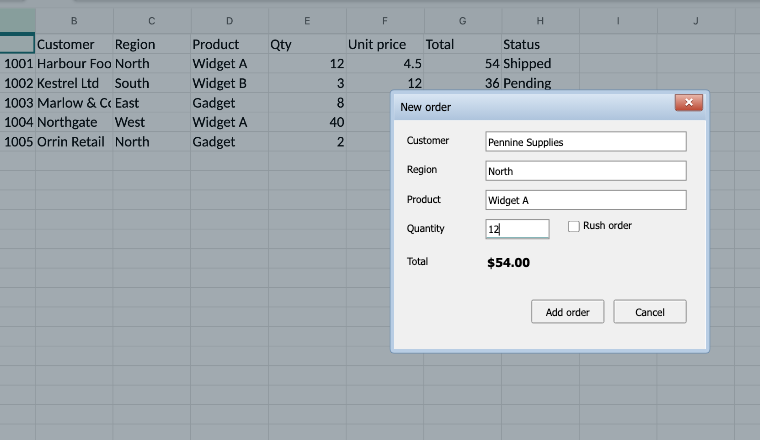
A UserForm opened by a macro.
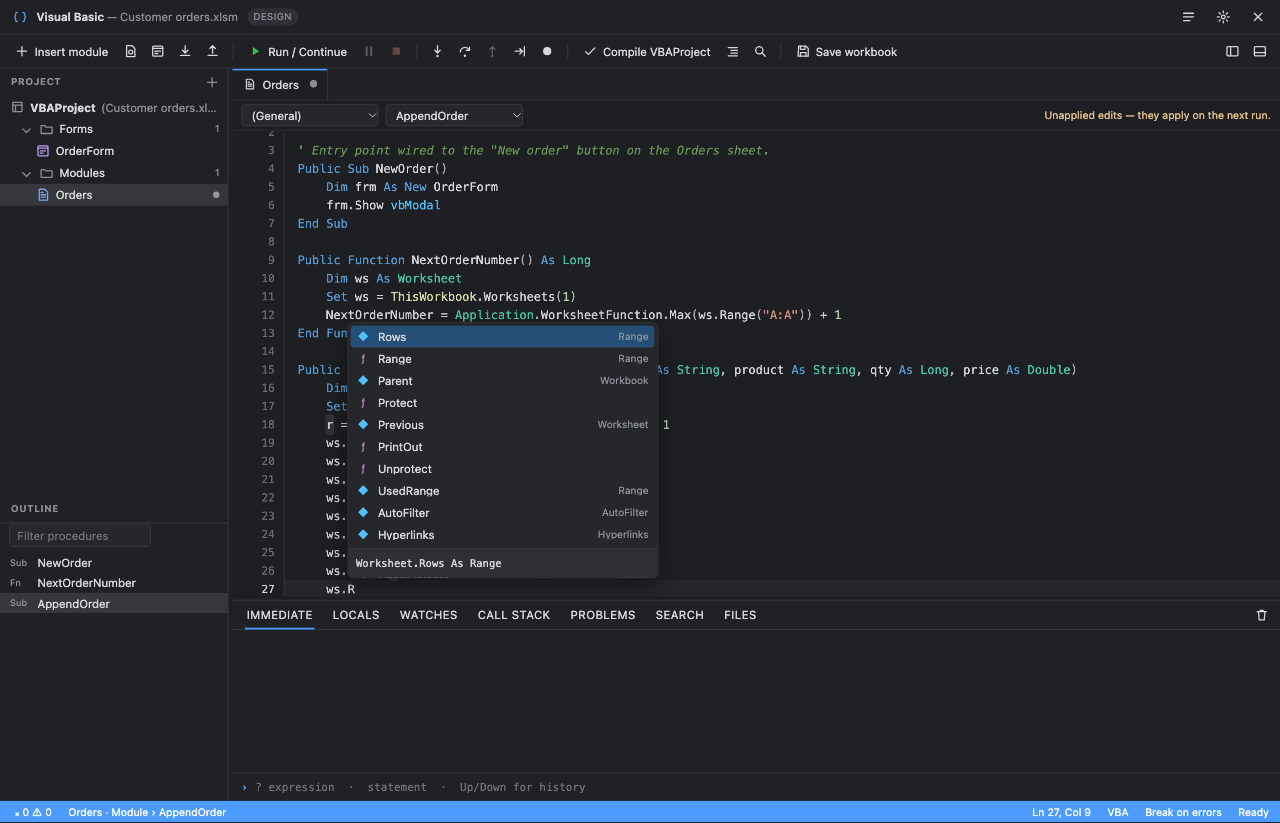
The Visual Basic editor.
Included in the Professional and Enterprise tiers. Macros never run automatically. The user enables VBA from the ribbon, or your code calls enableVba(), after which the project is imported from the file and executed in a dedicated worker with persistent state. Supported surfaces include:
- The core language: procedures, modules, classes, user-defined types, arrays, variants, error handling, string and date libraries.
- The common object model: Application, Workbook, Worksheet, Range, Names, Charts, PivotTables, Shapes, form controls and ActiveX-style worksheet controls.
- Worksheet user-defined functions, workbook and worksheet events,
Application.OnKeyandOnTime. - Standard UserForms with the usual controls, modal and modeless, with keyboard navigation.
- A Visual Basic editor with project explorer, IntelliSense, live diagnostics, a debugger with breakpoints, stepping, locals and watches, an immediate window, a UserForm designer, and Design Mode for worksheet controls.
- Saving modified XLSM files with the original VBA binary preserved.
Calls that would reach outside the browser run against stand-ins. File statements and Scripting.FileSystemObject use a virtual file system kept in the browser, with upload and download from the editor's Files tab. GetSetting and SaveSetting use browser storage instead of the registry, and Environ returns simulated values. VBScript.RegExp maps to JavaScript regular expressions and MSXML2.XMLHTTP to fetch. Shell opens web addresses only; SendKeys and AppActivate do nothing. MsgBox and InputBox are real dialogs. Application settings with no browser equivalent are accepted and remembered so macros do not stop on them. Your host can observe or override these through the host callback on VbaRunOptions.
await viewer.enableVba({ runOpen: true }); // also fires Workbook_Open
await viewer.runMacro('RefreshReport');
const bytes = await viewer.exportXlsx();  // xlsm with the project intact
Full Excel VBA parity is not claimed. Windows API declarations, COM automation of other applications, ActiveX controls that embed other components, and add-ins are not available. The support and limits document ships with the package and is the authoritative statement of what runs today; ask for a copy before you buy, and send us the workbooks that matter to you.
Fonts
Workbook text renders in its saved font family when the browser has it. Microsoft's fonts are not bundled, so a workbook set in Calibri falls back to metric-compatible substitutes unless you register the real face. Row heights and column widths still match Excel because metrics are computed from the saved family, not the fallback.
createExcelViewer(element, {
  fonts: [
    { family: 'Calibri', source: 'url(/fonts/calibri.woff2)' },
    { family: 'Calibri', source: 'url(/fonts/calibrib.woff2)', weight: 'bold' },
  ],
});
Each entry is a FontFace descriptor: family, a source URL string or font bytes, and optional weight, style, stretch and variationSettings. You are responsible for licensing the fonts you ship. legacyFonts takes a map of font name to TrueType or CFF bytes and is only needed for metafile drawings that reference glyphs by index.
Workbook model
The engine works on a plain, serialisable object graph. The important shapes:
| Type | Key fields |
|---|---|
Workbook | name, sheets[], definedNames[], tables[], pivots[], pivotControls[] (slicers and timelines), externalLinks, calculationMode, iteration, calculation (summary of the last run), vba (present when the file has a project), properties, warnings[], protection flags. |
Sheet | name, cells keyed by A1 address, range (used area), merges[], drawings[], controls[], dataValidations[], conditionalRules[], sparklines[], autoFilter, outline, scenarios, rows and columns dimensions, frozen, gridlines, hidden, protected. |
Cell | value (string, number, boolean or null), text (displayed), type, formula, format, style, link, notes, rich text runs, spill metadata. |
CalculationSummary | formulas, errors, unsupported[] function names, durationMs, iteration count and convergence, incremental statistics. |
Helpers: parseAddress('B2'), parseRange('A1:C3'), cellAddress({ r, c }), columnName(c), rangeToText(sheet, range) and selectionStats(sheet, range) for sum, count and average.
Calculation
The formula engine is implemented in this library; no third-party calculation code is used. It covers the Microsoft function catalog including dynamic arrays and spills, LET and LAMBDA, XLOOKUP and the modern lookup family, structured references, defined and sheet-local names, 3-D ranges, R1C1 INDIRECT, iterative calculation, what-if data tables, precision-as-displayed and legacy CSE arrays. Results are verified against workbooks recalculated by Excel for Mac; the compatibility target is Microsoft 365 Excel for Mac with English function names.
import { openWorkbook, calculateWorkbook, getFormulaFunctions } from '@sheetwarden/viewer';

const book = await openWorkbook(arrayBuffer, 'model.xlsx');
await calculateWorkbook(book, { trigger: 'automatic' });  // respect the saved mode
await calculateWorkbook(book);                            // explicit full recalculation
console.log(book.sheets[0].cells['B12'].value, book.calculation.unsupported);

const catalog = await getFormulaFunctions(); // [{ name, supported, conformance, reason? }, …]| Option | Purpose |
|---|---|
trigger | 'manual' (default, full), 'automatic' (honour saved mode), 'save' (honour calculate-before-save), 'full' or 'rebuild' (discard caches). |
calculationMode | Override the saved mode for this session: 'auto', 'manual' or 'autoNoTable'. The file is not changed. |
iteration | { enabled, maxIterations, maxChange } for circular references. Defaults to the workbook's saved settings. |
platform | 'mac' (default) or 'portable', which also enables Windows-only functions. |
locale | Text conversion profile for VALUE, NUMBERVALUE and East Asian width functions. Default en-GB. Formula syntax stays English. |
now | Clock for volatile functions and relative date filters, for reproducible results. |
euroCurrencyTools | Enable EUROCONVERT as if the add-in were installed. |
refreshPivotTables | Rebuild local PivotTables between passes. |
providers, providerTimeoutMs | External functions. See Custom functions. |
externalWorkbooks | Models for linked workbooks. See Linked workbooks. |
signal, onProgress | Cancel a long calculation, or report progress. |
Functions that need a service the browser cannot provide, such as cube connections, RTD, Python or add-ins, return an explicit error and are listed in calculation.unsupported. They never silently reuse a cached value. The same calculation options apply to the viewer.
Custom functions and formula providers
You can add your own worksheet functions. Register them up front through calculation.providers, or at any time with registerFunction; both take the same provider signature. Names are case-insensitive and must not collide with a built-in function.
await viewer.registerFunction('VAT', ({ arguments: [net, rate] }) => Number(net) * (1 + (Number(rate) || 0.2)));
await viewer.setCell('D2', '=VAT(B2, 0.2)');
console.log(viewer.getCell('D2').value);
A provider implements a function name that the workbook calls, for example a translation, a price feed or an internal lookup. The engine calls it with calculated arguments and reference metadata, supports scalar or array results, async dependencies, timeouts and cancellation, and re-evaluates on recalculation. Built-in functions cannot be overridden. No provider is configured by default.
createExcelViewer(element, {
  calculation: {
    providers: {
      TRANSLATE: async ({ arguments: args, signal }) => {
        const response = await fetch('/api/translate', { method: 'POST', body: JSON.stringify(args), signal });
        if (!response.ok) return { error: '#CONNECT!' };
        return response.json(); // string | number | boolean | null | 2-D array
      },
    },
    providerTimeoutMs: 15000,
  },
});
Linked workbooks
Formulas that reference another workbook show the values cached in the file. To calculate them live, bind the linked models explicitly by file name; nothing is fetched implicitly.
await calculateWorkbook(report, { externalWorkbooks: { 'Budget.xlsx': budget } });For hosts that keep several workbooks open, CalculationSession shares one calculation mode, evaluates linked dependencies together, keeps closed-workbook caches up to date and performs save-time calculation:
import { CalculationSession } from '@sheetwarden/viewer';
const session = new CalculationSession();
await session.open(budget);
await session.open(report);
await session.edit(budget, { kind: 'cells', sheet: 0, cells: [{ address: 'A1', input: '42' }] });
const bytes = await session.save(report, originalReportBytes);
await session.close(budget);
Export
Three serialisers cover the common cases. All return a Uint8Array ready for a Blob or an upload.
| Function | Use |
|---|---|
viewer.exportXlsx() | The displayed workbook with save-time calculation, as xlsx or xlsm. The usual choice from the viewer. |
exportWorkbook(book, original?) | Serialise a model. Pass the original file bytes to preserve untouched parts such as styles, drawings, pivot caches and the VBA binary. Synchronous; calculate first if you need fresh values. |
exportVbaWorkbook(original, book) | Write an xlsm after a VBA session, including macro-made changes. |
viewer.exportCsv() | Displayed values of the active sheet. No formulas or formatting. |
Legacy xls and xlsb inputs are exported as xlsx, with binary-only metadata such as normal-style fonts carried across. Encrypted inputs export unencrypted. The unmodified original is always available to download from the File menu.
Encrypted files
Password-protected workbooks open locally. OOXML files using Agile AES or Standard AES encryption and legacy xls files using RC4, RC4 CryptoAPI or XOR are supported. Other schemes are rejected with a clear message.
import { openWorkbook, decryptWorkbook, WorkbookEncryptionError } from '@sheetwarden/viewer';

try {
  const book = await openWorkbook(bytes, 'secret.xlsx', { password });
} catch (error) {
  if (error instanceof WorkbookEncryptionError) askForPassword();
}
Feature support
| Area | Status | Notes |
|---|---|---|
| xlsx, xlsm | Full | Including encrypted workbooks and threaded comments. |
| xlsb | Full | Native binary parsing of cells, styles, charts, pivots, slicers, tables and conditional formats. |
| xls (BIFF8, BIFF5) | Full | Charts, drawings, pivots, links and encryption decoded natively. |
| csv, tsv | Full | Lightweight path; the calculation engine is not loaded. |
| Formulas | Broad | Full catalog registered; verified against native results for the large majority. Unsupported functions report an error rather than a wrong value. |
| Number formats | Broad | Common numeric, date, time, fraction and scientific codes. Some custom-format rules are approximated. |
| Conditional formatting | Full | Rules, data bars, colour scales, icon sets, formula rules, including the Office 2010 extensions. |
| PivotTables | Full | Local aggregation and authoring. Data model and OLAP via pivotProviders. |
| Charts | Broad | Standard chart types and axes from modern and BIFF files. Some 3-D and combination styles render flat. |
| Drawings and pictures | Broad | DrawingML shapes, PNG, JPEG, EMF, WMF, PICT, DIB and legacy QuickTime codecs. Advanced text effects have limits. |
| Editing and export | Full | Professional tier. Round trips preserve untouched parts of the original file. |
| VBA | Core | Professional and Enterprise tiers. Core language and object model; see limits. |
| External workbook links | Cached values | Live when you bind the linked model; otherwise the file's cache is shown. |
| Power Query, data model | Not run | Results cached in the file are displayed and refresh through providers. |
| Screen readers | Partial | The active cell, controls and dialogs are announced. The grid is not exposed as a full semantic table. |
Limits
- Input files up to 75 MB; expanded ZIP content up to 300 MB, 100 MB per part; 60-second parse timeout.
- Formula arrays up to one million elements; dependency depth 512; LAMBDA recursion 256.
- Copy and CSV operations up to 2 million cells; find returns up to 5,000 results; zoom 50% to 200%.
- The normalised workbook stays in memory. Rendering is virtualised, but very large files are bounded by browser memory, especially on tablets.
- ZIP64 and multi-disk archives are rejected.
Deployment
Current Chrome, Edge, Firefox and Safari on desktop, and the same engines on tablets. The library uses Web Workers, Canvas 2D, Shadow DOM and WebCrypto. Serve it from your own origin: the worker must share the module's origin, and if you set a Content Security Policy, allow worker-src 'self' and blob: for downloads. There are no runtime network requests and nothing to host beyond static files. The viewer works offline once loaded.
Troubleshooting
- The viewer is blank or zero height. Give the host element a height; the viewer fills its container.
- "Failed to construct Worker" or a 404 for the worker. The worker asset was not emitted next to the module. Check that your bundler supports
new URL(…, import.meta.url), or copy theassetsfolder when using the archive. - Text looks slightly different from Excel. Register the workbook's fonts with the
fontsoption. Layout already matches; only the glyphs differ. - A function shows #NAME? or an error badge. Check
calculation.unsupportedon the model and the function catalog. Some functions need a provider or an environment Excel has and the browser does not. - The Evaluation badge appears in production. Pass
licenseKey, and check the domain restriction withverifyLicenseKey. - Styles leak into or out of the viewer. They should not; the viewer uses a Shadow DOM. Global
!importantrules on*selectors are the usual cause.
Getting help
Email , attaching the workbook if you are able to share it. Problems with real files are prioritised. Enterprise customers have a named engineer and response-time commitments in their agreement.