Run Excel macros and VBA in the browser
Excel Online does not run VBA. Excel for Mac runs some of it. Google Sheets runs none. If your product opens xlsm files, or your organisation depends on macro workbooks that have to work on Macs, Chromebooks or locked-down desktops, the options have been a Windows VDI farm or a rewrite. Sheetwarden runs the VBA in the browser.
How it works
When a workbook with a VBA project is opened, the project is read from the file and, once the user or the host enables macros, compiled and executed in a dedicated Web Worker. The runtime implements the VBA language and the Excel object model that ordinary business macros use: Workbook, Worksheet, Range, Names, Charts, PivotTables, Shapes and form controls. Nothing is sent to a server and no Office installation is involved.
await viewer.loadFile(xlsmFile);
await viewer.enableVba({{ runOpen: true }});   // fires Workbook_Open, like Excel
await viewer.runMacro('RefreshReport');
const bytes = await viewer.exportXlsx();        // xlsm, project intact
What runs
- Procedures, functions, classes, user-defined types, arrays, variants, error handling, string and date libraries.
- Worksheet user-defined functions called from cells, and workbook and worksheet events such as Change, SelectionChange and Open.
- UserForms, modal and modeless, with text boxes, combo boxes, list boxes, check boxes, option buttons, frames, spin buttons and scroll bars, driven by the keyboard as in Excel.
- Buttons and form controls on the sheet, assigned to macros.
- Application.OnKey and OnTime, MsgBox and InputBox as real dialogs.
- Saving back to xlsm with the original VBA binary preserved, so the file still opens in desktop Excel.
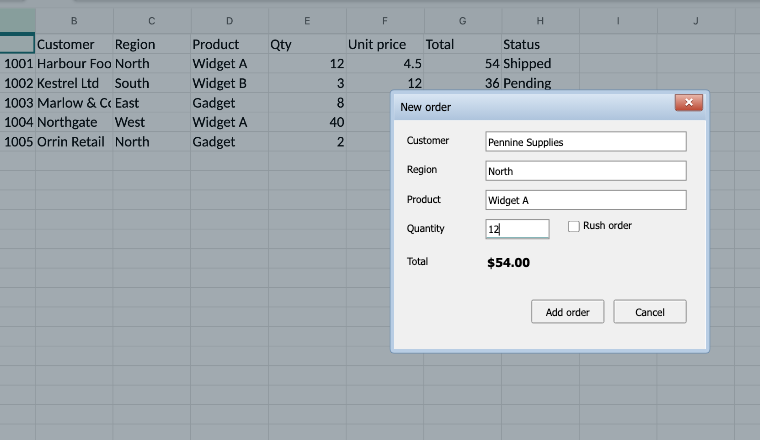
An order form from an XLSM file.
What happens to Windows-only calls
Macros that touch the machine run against browser stand-ins rather than failing. File statements and FileSystemObject use a browser-side drive with upload and download. GetSetting and SaveSetting use browser storage. VBScript.RegExp maps to JavaScript regular expressions and MSXML2.XMLHTTP to fetch. Shell opens web addresses only, and SendKeys does nothing. Application settings with no browser equivalent are accepted silently so macros don't stop on them. Windows API declarations and COM automation of other applications are not available.
A real editor, too
The built-in Visual Basic editor has IntelliSense for the Excel object model, live diagnostics while you type, go to definition, rename across the project, breakpoints with locals, watches and a call stack, and a UserForm designer. If a customer's macro needs a change, it can be made in the browser and saved into the file.
Honest limits
Full Excel VBA parity is not claimed. The core language and the common object model are implemented and tested against real applications; unusual API corners may be missing. The support document ships with the package, and we prioritise fixes for the workbooks customers actually send us. The VBA runtime is included in the Professional and Enterprise tiers.
Related guides
- Render xlsx files in the browser without a server
- Excel viewer component for React, Vue and Angular
- Alternatives to SheetJS Pro, SpreadJS and Handsontable
Try it now: open the live demo and drop in one of your own files. Nothing is uploaded. Then see the documentation or pricing.